Checklist
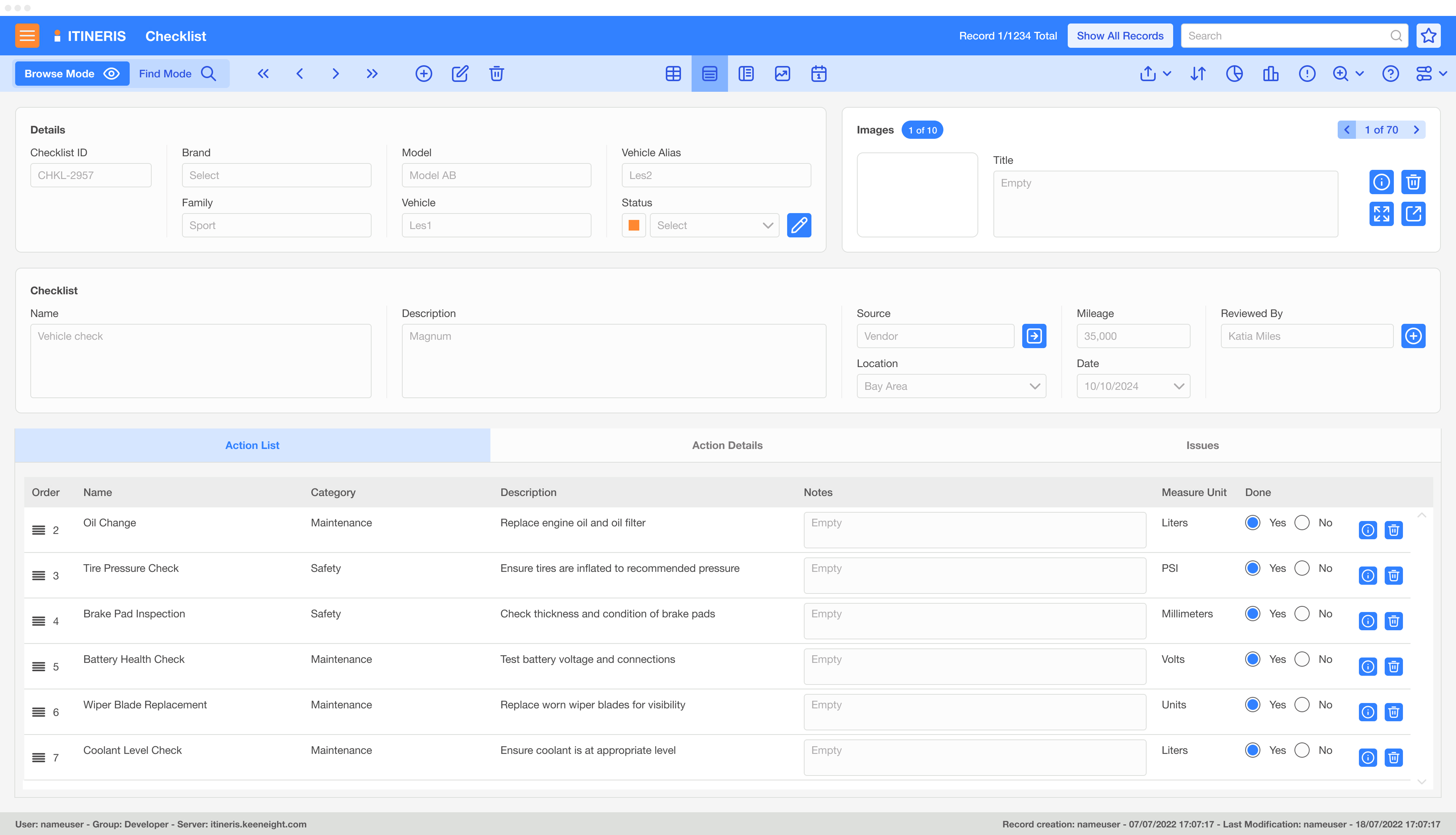
The Itineris Checklists module provides a robust and flexible framework for creating, managing, and utilizing checklists across various workflows and processes. By offering customizable templates and seamless integration with other Itineris modules, the Checklists module ensures consistency, efficiency, and compliance in task execution across teams and projects.
The Itineris Checklists module is an indispensable tool for managing tasks and processes in a structured and efficient manner. Its flexibility, integration capabilities, and centralized action library ensure that critical steps are executed consistently, enabling teams to achieve operational excellence across projects and workflows.
Key Features
1. Customizable Checklist Templates:
- Allows users to design checklist templates tailored to specific needs or processes.
- Templates can be used as standalone tools or integrated with other Itineris modules, such as Run Sheets (for testing activities) and Job Cards (for workshop operations).
2. Centralized Action Library:
- Checklists are composed of Actions, which are individual tasks or steps stored in a centralized library.
- Actions are defined once and can be reused across multiple checklists, ensuring standardization and reducing redundancy.
- Example Actions include tasks like “Inspect tire pressure,” “Verify component alignment,” or “Calibrate sensors.”
3. Integration with Itineris Modules:
- Run Sheets Integration: Ensures that pre- and post-test activities are logged and tracked systematically.
- Job Cards Integration: Links checklist items to specific workshop tasks, providing clear instructions and ensuring completion of critical steps.
- Issue Tracker Integration: Automatically logs unresolved checklist items as issues for further investigation.
4. Progress Tracking and Completion Monitoring:
- Tracks the status of each checklist in real-time, showing which Actions are completed, pending, or overdue.
- Provides visibility into task progress across teams, ensuring accountability and adherence to timelines.
5. Customizable Workflows:
- Checklists can be configured to include mandatory tasks, conditional steps, and dependencies.
- Supports approval workflows, ensuring critical tasks are verified before proceeding.
6. Data Collection and Reporting:
- Checklists can capture additional data, such as measurements, observations, or photos, directly within the module.
- Generates detailed reports on checklist usage, task completion rates, and compliance metrics.

Benefits
- Standardization Across Teams: Ensures that tasks are executed consistently, adhering to predefined procedures and best practices.
- Efficiency in Task Management: Reduces the time and effort required to create and manage checklists by reusing predefined Actions from the centralized library.
- Enhanced Compliance and Traceability: Provides an auditable record of task completion, supporting regulatory compliance and internal quality standards.
- Improved Collaboration: By integrating with other Itineris modules, the Checklists module facilitates seamless communication and coordination across teams.
- Flexibility for Various Applications: Can be used across diverse scenarios, including quality assurance, maintenance, project management, and testing.
- Proactive Issue Management: Links unresolved or incomplete tasks to the Issue Tracker, ensuring that no critical steps are overlooked.
Applications
- Testing and Validation: Ensures all necessary steps are completed during DVP testing or prototype evaluations.
- Workshop Operations: Guides technicians through repair, maintenance, and assembly tasks.
- Quality Assurance: Tracks compliance with internal or external quality standards through detailed checklists.
- Project Management: Provides a structured way to monitor and manage project milestones and deliverables.
Example Scenario:
During the validation of a new braking system, the Itineris Checklists module is used to create a pre-test checklist:
- Actions such as “Inspect brake pads,” “Verify hydraulic line connections,” and “Calibrate brake sensors” are pulled from the centralized library.
- The checklist is linked to the Run Sheets module, ensuring that these steps are documented as part of the test procedure.
- During execution, a technician notes that the hydraulic line needs adjustment and logs this as an unresolved item, which is automatically transferred to the Issue Tracker for further action.
- A post-test checklist verifies that all necessary steps were completed and documented, ensuring compliance with testing protocols.